Video Music
Refine your video content with the most relatable audio background to bring the emotion and ambiance as you intended to your to the audience. Uplifting, intense, playful, gloomy? We got you covered! With hundreds of royalty-free music selection for your wholesome video production. Maximize your content at Facebook, Youtube, and other social media platform with legally copyrighted audio!
How to add background sound video
How to:
1. Choose background music
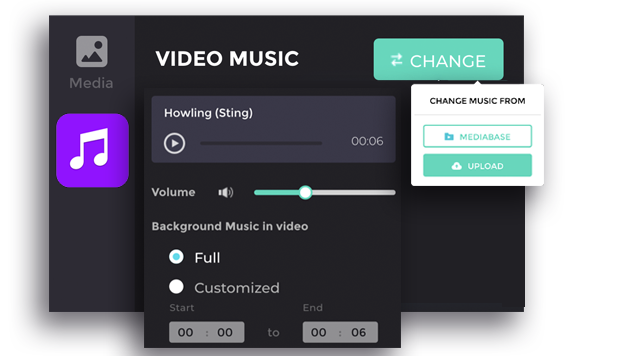
Click “Change” to add the music for your video. Select “Mediabase” to explore our hundreds of copyright-free music selection or select “Upload” to apply your own music for the video.
2. Volume adjustment
Adjust the volume of your music volume to the appropriate level. Noted that the adjustment is applied for the whole video.
3. Choose the music starting point
Choose “Full” to play the song from the beginning of the video or choose “Customized” to set up the time to play the song.
“Start” - the time when the song will start to play in the video.
“End” - the time when the song will stop in the video.